
Shopify Navigation SEO: How Menus Decide What Ranks
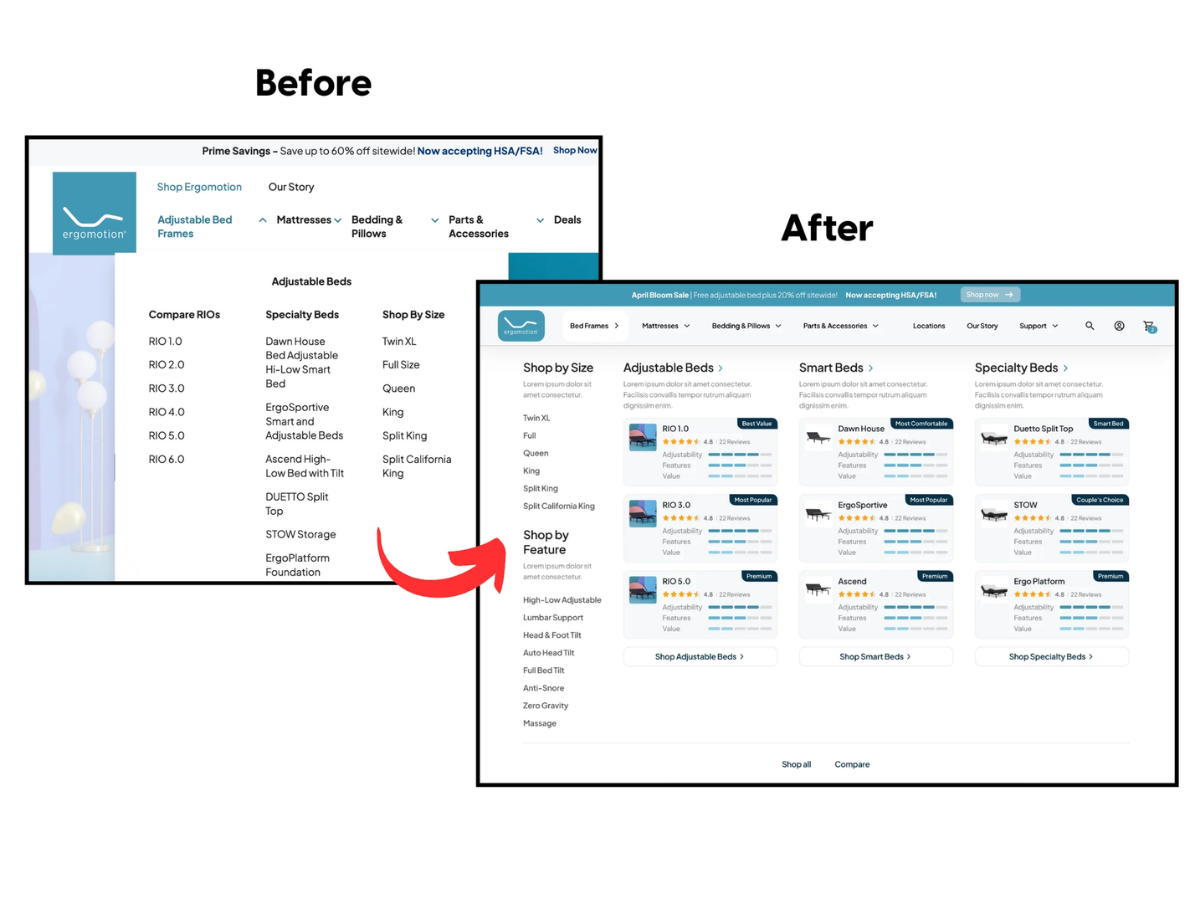
Shopify navigation SEO decides what ranks by handing every page in your main menu a link from every page on the store, and Google says more internal links make a page look more important. Nothing hands out links like a sitewide menu. Your menu collections are the pages you chose to rank, whether you meant to or not.
Key Points
| Lever | What it does | Proof |
|---|---|---|
| Main menu slot | Links the page from every URL on the store | Google: more internal links, higher relative importance |
| Anchor text | Tells Google what the page is about | Zyppy: pages with an exact-match anchor got 5x the traffic |
| Click depth | Flags what matters, one click from home | John Mueller: depth from the homepage matters more than URL structure |
| Menu labels | Decides whether shoppers and crawlers understand the page | Baymard: 58% of desktop sites rate mediocre to poor on navigation |
How Do Menus Actually Move Rankings?
Menus move rankings by multiplying internal links at scale. Google’s ecommerce site structure documentation says the more internal links a page has, the higher its relative importance, and a main menu link repeats on every page of the store. A 2,000-page store hands each menu item 2,000 links. Google even prescribes the shape: menus to categories, categories to subcategories, subcategories to products.
That effect is measurable. Zyppy’s study of 23 million internal links across 1,800 sites found pages with 40 to 44 inbound internal links earned roughly four times the Google clicks of pages with fewer than five, and pages with at least one exact-match anchor got five times the traffic of pages without one. The same study found sitewide navigation links showed the strongest effect on larger, established sites, which is one honest caveat: a brand-new store gets less from its menu than a store with two years of links behind it.
Just know the curve bends back. Zyppy also saw Google traffic decline once a URL passed about 45 to 50 internal links, which is the case against dumping every collection into a mega menu: the votes get spread thin, and the pages that matter most stop standing out from the ones that do not.
Distance matters too. John Mueller has said click depth from the homepage signals relevance more than URL structure does, so a collection one click from home is a collection you have flagged as important, and a collection buried three clicks deep is one you have told Google to ignore. Most stores that come to me with a Shopify store that is not ranking have their best category buried and a sale page linked sitewide.
Put Your Money Collections in the Menu
Putting your money collections in the menu is the single highest-return navigation change. Those are the pages that win product searches, and a collection outside the menu is competing while buried. Shopify lets you nest menus up to three levels deep, and most themes show two. The pattern that wins is top slots for major collections, subcollections nested under them, every one named with the search term.
- Name menu items with the phrase people type, “Waterproof Jackets” not “The Storm Shop,” because the anchor text tells Google what the page is about.
- Give every money collection a menu spot, since a collection nobody links to is exactly the page collection page SEO cannot rescue on its own.
- Use real link items for anything you want crawled, never placeholder headers that open a dropdown without going anywhere.
- Add breadcrumbs, which Google uses to categorize the page and shoppers use to climb back up a level.
That fourth item matters more than it looks. Breadcrumbs repeat the category path on every product page, so each product hands its parent collection one more keyword-named link, and Google shows the path under the result instead of the raw URL.
Ergomotion is the clearest case I have of a menu doing this. Adding “Shop by” hub pages to the navigation for size, feature, and condition searches put those hubs on page one, and peak season total sales rose 103% with Google Search sales up 139%. Nothing about the products changed. The menu changed which pages Google thought were important.
The Menu Mistakes That Waste Its Power
The menu mistakes that waste its power come down to spending the store’s biggest source of links on pages that cannot rank or do not sell, and Baymard’s navigation research, built from more than 16,000 UX scores across leading retailers, rates 58% of desktop sites and 67% of mobile sites mediocre to poor on homepage and category navigation. No site in the benchmark performed exceptionally well. The bar for winning is low.
| Mistake | What it costs | Fix |
|---|---|---|
| “Shop All” as the first menu item | Sitewide links to a page that ranks for nothing | Lead with the biggest money collection |
| Menu built from tag or filter URLs | Links to thin pages that compete with their parent | Link real collections only |
| Internal brand names as labels | Crawlers and shoppers both miss the meaning | Rename to the search term |
| Headers that open a dropdown but link nowhere | Parent category never gets the link | Make the header a real link to the parent collection |
| Forty subcategories with no grouping | Shoppers scan and leave, Google sees noise | Group into five to eight parents |
Two of those are worse than they look. Baymard found 60% of sites overload subcategories without grouping and 33% fail to make category headers clickable, which means the parent collection, usually the most valuable page in the group, never gets the menu link at all. The tag-URL mistake does quiet damage too, because a tag page self-canonicalizes and takes a share of the votes, one of the Shopify canonical URL splits that shows up as two URLs trading places in the rankings.
Even so, the mistake I see most is the invisible one. Menus built as JavaScript events without an href are not links to Google, since its crawlable links guidance only counts anchor tags with a resolvable URL. A menu that works perfectly for a shopper can hand out zero votes, and it is a common surprise in a theme audit.
Write Menu Labels That Read Like Searches
Menu labels that read like searches help rankings since the label is the anchor text, and Zyppy found the relationship between anchor text and Google clicks so strong that it ran the data three times: pages with at least one exact-match anchor had at least five times the traffic of pages without one. “Heated Vests” is an exact-match anchor. “Stay Warm” is a slogan Google cannot file anywhere.
So write every label the way a shopper would type it, with the product noun first and the modifier second. “Men’s Waterproof Jackets” beats “Waterproof Jackets for Men” because the first two words carry the category, and it beats “Rain Gear” because nobody types that when they are ready to buy. If your collection titles already match the search term, the menu label should match the collection title word for word.
Beyond that, give the same collection a second anchor somewhere off the menu. Zyppy’s data shows anchor variety lifts traffic, and a sitewide menu can only ever supply one phrasing, which the study names as the reason navigation links plateau. A blog post that links “best heated vests for women” and a homepage block that links “heated vests” hand the collection two more phrasings the menu cannot.
Mobile makes the label rule stricter. Baymard found 59% of mobile sites fail to make clear that a menu link leads to a filtered product list rather than a page, so a label like “Sale” or “New” on a phone is a guess for the shopper and a weak anchor for Google. Name the destination, not the mood.
How Do You Restructure Without Breaking Things?
You restructure without breaking things by changing the menu, not the URLs. A Shopify menu edit swaps links without touching a single address, so there are no redirects to manage and nothing to lose. Plan it on paper first. Rank your collections by revenue and by search demand, and give the top performers the top slots.
The list rarely matches the current menu, which is the point of writing it down. Screenshot the old menu before you touch it, make the change in one sitting rather than over a week, and leave every collection URL exactly as it was, since the whole safety of this method rests on the addresses never moving. Promote no more than the theme handles gracefully, nest subcollections under their parents, and let the six strongest categories carry the top row. A menu of six strong collections beats a mega menu of forty weak ones, both for the authority math and for the shopper scanning it on a phone.
Then watch two things for a month. In Search Console, compare impressions for the promoted collections against the month before the change, and in your behavior data, watch whether shoppers reach a product page in fewer clicks. Impressions rising on the pages you elevated is the menu doing exactly what this post promised, and it costs nothing but the edit. It is also the first structural change I make in my Shopify SEO services, before any page gets rewritten, because everything written afterward inherits the links.
Menu Questions
How many items should the main menu have?
The main menu should have five to eight top-level items for most Shopify stores. That is the range a shopper can scan on a phone without a second look, and it keeps each item’s share of the sitewide votes meaningful. Baymard’s data shows overload is the more common failure, not sparseness. Put the rest one level down, grouped under a parent that is itself a real collection link. If you cannot get below eight, the fix is usually merging two small collections into one bigger one that matches a broader search, not a wider menu.
Does a mega menu help or hurt SEO?
A mega menu helps SEO on a large catalog and hurts on a small one. Nielsen Norman Group’s mega menu research found they outperform standard dropdowns when a site has enough categories to fill them with grouped, labeled options. On a store with twelve collections, a mega menu spreads the votes thin and makes the store look bigger than it is. Match the menu to the catalog, not to what the theme demo shows.
Do footer links count the same as main menu links?
No, footer links do not count the same as main menu links. Google weighs a link partly by where it sits on the page, and a link in a footer nobody clicks carries less than a link in the main navigation shoppers use on every visit. Footers are the right home for policy pages, contact, and the blog index. They are the wrong home for the collection you most want to rank.
Should the blog be in the main menu?
The blog belongs in the main menu only when it sells, meaning its posts link to collections and products and the index page ranks for something. A top-level “Blog” item otherwise spends a sitewide vote on a page with no buying intent. Most stores are better off with the blog in the footer and the best three posts linked from the collections they support. The exception is a store whose guides drive most of its organic traffic, where the blog index is a real hub and earns its slot.
Let the Menu Vote for the Pages That Pay You
Shopify navigation SEO is recognizing that your menu distributes importance: every slot is a sitewide vote, keyword-named anchors tell Google what the pages mean, and click depth from the homepage flags what matters. Put your money collections one click from home, keep tag pages and dead headers out, add breadcrumbs, and let the menu vote for the pages that pay you. Most stores never think about this at all, which is precisely the size of the opportunity.
I help Shopify brands stop renting their customers from Meta and Google by building search and AI visibility that keeps sending buyers after the ads turn off. Book a call and I will map your menu against your revenue and rankings and show you which collections are buried. If you want the restructure handled, that is part of my Shopify SEO services.
Sources:
- Google Search Central, Help Google understand your ecommerce site structure
- Zyppy, Internal links SEO study of 23 million links
- Search Engine Journal, Google on click depth and URL structure
- Google Search Central, Breadcrumb structured data
- Baymard Institute, Ecommerce navigation best practices
- Google Search Central, Make your links crawlable
- Nielsen Norman Group, Mega menus work well
