How to Track AI Traffic in GA4
To track AI traffic in GA4, open the AI Assistant channel Google added in May 2026, then build a custom channel group with one regex to catch the tools it leaves out. The built-in channel names ChatGPT, Gemini, DeepSeek, Copilot, and Grok. The custom group adds Perplexity and Claude and takes about ten minutes.
Step 1: Check the AI Assistant Channel
Check the AI Assistant channel first, since GA4 now sorts most chatbot visits for you. Google’s default channel definitions describe it as the channel for users who arrive “from sources like ChatGPT, Gemini, Deepseek, Copilot, or Grok.”
To find it, open Reports, then Acquisition, then Traffic acquisition, and look for AI Assistant in the channel column. Search Engine Journal reported the channel went live on May 13, 2026. Behind it, GA4 matches the referrer against a list of AI assistants and stamps the visit with the medium “ai-assistant.” Google does not publish that list.
| Where the visit came from | Where GA4 puts it |
|---|---|
| ChatGPT, Gemini app, Copilot, Grok, DeepSeek | AI Assistant |
| Perplexity, Claude, and newer tools | Often still Referral, so check |
| Google AI Overviews and AI Mode | Organic Search |
That last row matters more than the other two. Google’s definition says the channel excludes AI Overviews and AI Mode, so some of your “organic” clicks are already AI clicks. Keep that in mind before you decide whether AI search is killing your organic traffic.
Step 2: Build a Custom AI Channel Group
Build a custom AI channel group next, because it catches the tools Google’s list misses and it reaches back in time. Google’s help page says custom channel groups apply to your reports retroactively, so you get your AI history from before the built-in channel existed.
Follow these clicks in order:
- Go to Admin, then Data display, then Channel groups.
- Copy the Default channel group and name the copy “Default + AI.”
- Add a new channel and call it AI.
- Set the condition to Session source, matches regex, and paste the pattern below.
- Save the channel, then save the group.
.*(chatgpt|openai|perplexity|gemini\.google|copilot\.microsoft|claude\.ai|meta\.ai|grok\.com|deepseek|mistral\.ai).*
Keep the dot-star on both ends. GA4 treats a regex as a full match unless you add it, so a bare “chatgpt” would miss “chatgpt.com.” The pattern also catches visits ChatGPT tags with utm_source=chatgpt.com, which arrive with a source name and no referrer.
Add a domain to the regex the day a new AI tool shows up in your Referral report. A tool you never added is a visit counted somewhere else.
Once a quarter, sort the Referral report by sessions and scan the top 30 sources for names you do not know. New assistants launch faster than Google updates its list, and that scan takes two minutes.
Step 3: Move the AI Channel Above Referral
Move the AI channel above Referral in the group, since GA4 files each visit under the first channel it matches. Google’s documentation puts it this way: “Traffic is included in the first channel whose definition it matches given the current order of channels in the group.”
So drag AI to the top of the list. Leave it at the bottom and Referral takes every chatgpt.com visit before your rule ever gets a look.
Then pick the new group in the dropdown above the Traffic acquisition table. A standard property gets two custom groups with 50 channels each, so this one costs you nothing you will miss.
Step 4: Compare AI Visits to Organic
Compare AI visits to organic on two numbers once the channel has four weeks of data: landing pages and conversion rate. Those two tell you whether the chatbots are sending shoppers to your best pages or your worst ones.
On landing pages, Shopify’s Q1 2026 data found about 55% of AI sessions start on a product page. If yours start on old blog posts, the chatbots are quoting your articles and skipping your products.
On conversion rate, expect AI visitors to buy at least as often as search visitors. Adobe measured AI traffic to US retail sites up 393% year over year in Q1 2026, and in March those visits converted 42% better than the rest. A year earlier they converted 38% worse.
Still, keep the size in view. Exclusive Beauty Club earns about $3k a month from ChatGPT next to $28k from Google, and the Exclusive Beauty Club case study shows both lines. The channel is small and growing fast, which is why I check whether AI citations convert into customers store by store.
Step 5: Check Search Console for Google’s AI
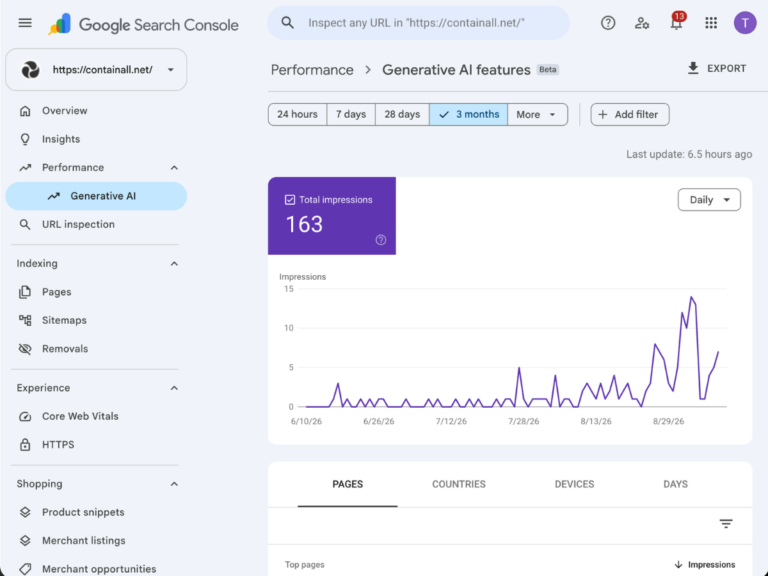
Check Search Console for Google’s AI, because GA4 folds AI Overviews and AI Mode into Organic Search and cannot split them out. Google rolled its generative AI performance report out to all websites on August 31, 2026.
Just know the report counts impressions only. It shows how many times a link to your site appeared in an AI Overview or AI Mode, by page, country, date, and device. It gives you no clicks and no queries.
Even so, the page list is worth ten minutes a month. Sort it by impressions and compare the top ten pages to the landing pages in your GA4 AI channel. When Google’s AI shows a page often and ChatGPT never sends anyone to it, ask ChatGPT that page’s question by hand and see who it names instead. I walk through every filter in my guide to the AI performance report in Search Console.
Step 6: Read Direct and Your Server Logs for the Rest
Read Direct and your server logs for the rest, since a share of AI visits never carries a referrer and some AI reads never fire your tag at all. Mobile apps and copy-pasted links often arrive with nothing attached, and GA4 files them under Direct.
One sign is easy to spot. If Direct sessions to deep product pages climb while your email and ad volume stay flat, AI answers are a likely cause.
Your logs hold the other half. OpenAI documents a ChatGPT-User agent that fetches a page when a person asks ChatGPT about it. Those fetches shape what the chatbot says about your store, and only your server logs record them.
GA4 measures the clicks AI sends you, and it will never show you what the AI said. For that side you need prompt tracking, and I compare the options in the best AI visibility tracking tools.
What to Do If the AI Channel Is Empty
Why does my AI channel show zero sessions?
Your AI channel shows zero sessions for one of three reasons: the report is still set to the default group, the AI channel sits below Referral, or the regex is missing the dot-star on each end. Check the dropdown first, since the wrong group selected is the usual culprit.
What if the AI channel is right and the number is still tiny?
A tiny AI channel is normal for most stores in 2026, and it usually means the chatbots are not naming you yet. That is a visibility problem, not a tracking problem. Getting named in more answers is the work my AI search services for Shopify stores are built around.
Your Next Moves
- Tonight: open Traffic acquisition and see whether the AI Assistant channel already has sessions.
- This week: build the custom group, paste the regex, and drag AI above Referral.
- Next month: compare the AI channel’s landing pages and conversion rate to organic, then open the Search Console report for the Google side.
- If you want it done for you: book a call and I’ll build the channel group in your property and show you what ChatGPT sends your store today. If the number needs to grow, my AI search services start there.
Sources:
- Google Analytics Help: Default channel group
- Google Analytics Help: Custom channel groups
- Search Engine Journal: Google Analytics adds AI Assistant as a default channel
- Search Console Help: Generative AI performance report
- Shopify: AI search insights
- Adobe: AI traffic surge to US retail sites
- OpenAI: Overview of OpenAI crawlers